Pages

Free DVD Creator on Wondershare Halloween Giveaway

Halloween Giveaway, Free DVD Creator for Mac and Windows from Wondershare. October 31st is Halloween day and to celebrate upcoming Halloween day, Wondershare giving away DVD creator software. This software is useful to backup your video collections to DVD disc. Wondershare will give the full version DVD creator Windows version (worth $25) and Mac version (worth $49). The giveaway will start from from October 27th to November 2nd, 2011.

Wondershare DVD creator is great software to create DVD photo slideshow, create your own DVD movie from your video collections. With this software you can burn your project to DVD disc directly without third-party software or you can create ISO or DVD folder using it.

DVD Creator for MAC

DVD creator Mac version support for Mac OS X 10.5, 10.6 and newest version Mac OSX lion (10.7), whereas the windows version support and compatible with windows 7, Vista, NT, Windows 2K and Windows XP. For your convenience when using this software you computer CPU must 1GHz or higher.

Download Nero Kwik Media free Media Manager

Nero launches new software called “Nero Kwik Media“. Nero Kwik Media is free media manager to manage photo, music and video. Previously it know as Nero BurnLite but now it better and faster. Now this software support for Blu-ray Disc and support drag and drop to copy iTunes playlist. But Data burning and copy disc features is not active after first time installed. To activate the Copy disc ad data burning features, you activate/download Nero Kwik Burn app from the app store within the Kwik Media windows.

Nero says, Nero Kwik Media is all in one media manager in easy-to-use interface. Whit this software you can burn video, music to discs, create photo slide show, sync music playlists to any mobile device and more. Although equipped with all these powerful, the Nero Kwik media is still free.

Nero Kwik Media
Nero Kwik Media key Features

  • Burn video,photos, music and data onto various disc media such as CD, DVD and Blu-ray Disc
  • Support drag and drop to copy playlists from iTunes. Its new feature that does not found in nero burn lite
  • Copy unprotected CDs, DVDs and Blu-ray Discs
  • Rip MP3 files for sharing and storing

How to Download Nero Kwik Media

Note: Nero kwik media id discontinued project Nero Burn lite

Free Full Version 5 Ashampoo Software

Ashampoo Free Full Version 5 Ashampoo Software. The software given as Christmas giveaway. To obtain the sofware you need a Ashampoo coupon code. The coupon code can be used on this giveaway is “merryxmas“. Other coupon code that can be used “ASH-444LW1“.

The Ashampoo software given in the giveaway: Ashampoo Registry – Cleaner to optimize windows registry for more performance, Ashampoo Burning Studio Elements a popular and easy to burning software, Ashampoo Photo Converter useful software to convert, re-size and add watermark to photo, Ashampoo Photo Optimizer 3 to optimize your photos collection, Ashampoo Photo Commander 8 to manage your photo collections. Total value of the software given is $109.95.

Ashampoo Software Full Version

All software mentioned above is free for everyone. This is a gift on this holiday to everyone. Just use and redeem the Ashampoo coupon code that mentioned above. Here how:

How to Get Free Full Version 5 Ashampoo Software

  1. Open the Ashampoo giveaway page at: www.ashampoo.com/gift
  2. Use coupon code “merryxmas” or “ASH-444LW1” in the redeem form to obtain the 5 softwares for free.
  3. Click on ”Get downloads now”. The download link of the free Ashampoo software will appear automatically.
  4. Download on of the software you want, or download all software.

Note: To obtain the license key for all Ashampoo software mentioned above. After install the software in you PC, the registration form will appear automatically. Follow the process to obtain the license key.

Recover Deleted Files and Folders for Free with Recuva

There are many file recovery software in internet that can be used to recover deleted file in the computer. Most of the programs recovery not free, but for free solution you can use recuva software.Recuva is free software from piriform that allow user to recover deleted file in their computer. But unhappily this software only can recover deleted file and cannot be used to recover lost file caused formatting hard disk or partitioning the hard disk.

Recuva software is support to recover deleted file from Windows computer, Recycle Bin, digital camera card, or MP3 player. I have tried this software to recover deleted file from my flash disk and it success recover the deleted file. Recuva can detect the file that deleted by 4 secure deletion methods, are: simple overwrite, DOD, NSA and Gutmann methode.

How use Recuva to Recover Deleted File :

  • Download and install recuva software. Recuva software from link under this article. Install the software and run it.
  • Select file type to be recovered. if you want to recover all file select other then click next.
    recuva
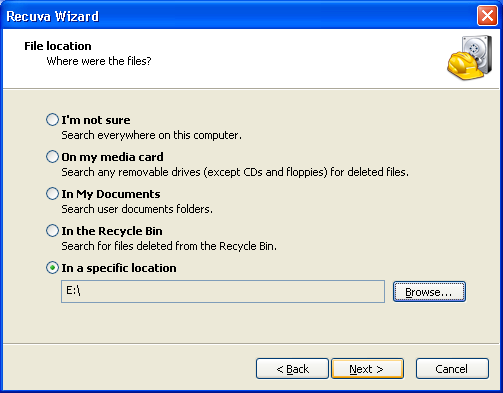
  • Select where the file location wishing you recover then click next and then click start to scan your drive.
    recuva
  • After process of scan finish, select/check the file that you want to recover then click recover button.

You can download recuva software from piriform website: download Recuva

How to Get Data Back Using GetDataBack Software

Many reason can cause you data lost, for example accidentally deleted the file, formatted hard disk when installing new OS, etc. A lots of software can be used to get your data back, some free and some paid software.On this tutorial I use GetDataBack software to restore the lost data on windows setting. This software support for FAT, FAT32 and NTFS hard disk format. The Get Data Back software can be used to restore data caused by deleted file, formatted hard disk.

To restore data using this software will take several minutes depending to partition or hard disk size to restore. If your hard disk to restore having a Gigabyte size possibility the process will take several hours.

Follow this tutorial to restore the lost data using Getdataback software :

  1. Run GetDataBack software and select what causes your data lost, cause by FDISK, Installing new OS, Formated or deleted. If you don’t know what causes your data lost, you can select I don’t know then click next.
  2. Select hard disk partition to restore or you can select all partition then click next. On the next steps this software will scan and search the lost data on the Hard disk partition selected. This process will take several minutes/hours depending to partition size to restore.
    undefined
  3. After scanning/searching finish, you’ll be asked to select file system to be displayed in the recovery tree then click next. This software will extract the data.
  4. The Last process is restore the data. To restore the data right Clicking mouse at the data to restore, select copy, select destination folder then click Ok.

GetDataBack software not free, if you want need full version of this software, you can search crack or sn this software from internet. You can download trial version of this software at runtime website here: http://www.runtime.org/datarecovery.htm